
Optimizing Amazon S3 Costs: A Deep Dive into Storage Classes
Amazon Simple Storage Service (Amazon S3) is renowned for its durability, availability, and scalability. However, as data footprint grows, so do storage costs. A vital strategy for optimizing AWS infrastructure costs is understanding and correctly utilizing the various S3 storage classes available.
AWS offers a range of S3 storage classes designed for different data access patterns, performance requirements, and price points. By intelligently mapping your data to the right class, you can realize significant savings.
Understanding the Primary S3 Storage Classes
When evaluating where to store your data, consider how often you need to access it and how quickly you need it when requested.
1. S3 Standard: The Default Choice
- Best For: Frequently accessed data.
- Characteristics: High throughput, low latency. This is the default class and the most expensive per GB stored, but it has low retrieval fees.
- Use Cases: Cloud applications, dynamic websites, content distribution, mobile and gaming applications, and big data analytics demanding immediate access.
2. S3 Standard-Infrequent Access (S3 Standard-IA)
- Best For: Data accessed less frequently but requiring rapid access when needed.
- Characteristics: Lower storage cost than Standard but introduces a retrieval fee per GB. It has a minimum storage duration of 30 days and a minimum billable object size.
- Use Cases: Long-term backups, disaster recovery files, or older data sets that are still occasionally read.
3. S3 One Zone-Infrequent Access (S3 One Zone-IA)
- Best For: Re-creatable, infrequently accessed data.
- Characteristics: Costs 20% less than S3 Standard-IA by storing data in a single Availability Zone (AZ) rather than across a minimum of three. It is vulnerable to physical AZ loss.
- Use Cases: Secondary backups of on-premises data or easily re-generated storage, such as resized image thumbnails.
4. The Glacier Family (Archive Tier)
For data that is rarely accessed and where retrieval times from minutes to hours are acceptable, the Glacier classes offer the lowest storage costs.
- S3 Glacier Instant Retrieval: For long-lived data that is rarely accessed but requires millisecond retrieval when needed (e.g., medical imagery, news media assets).
- S3 Glacier Flexible Retrieval (formerly S3 Glacier): For archives where retrieval times of 1 to 12 hours are acceptable. This tier offers free bulk retrievals.
- S3 Glacier Deep Archive: The absolute lowest cost storage class, designed for long-term retention and digital preservation where retrieval times of 12 to 48 hours are acceptable.
Automated Cost Optimization: S3 Intelligent-Tiering
If your data access patterns are unknown or unpredictable, S3 Intelligent-Tiering is the recommended choice.
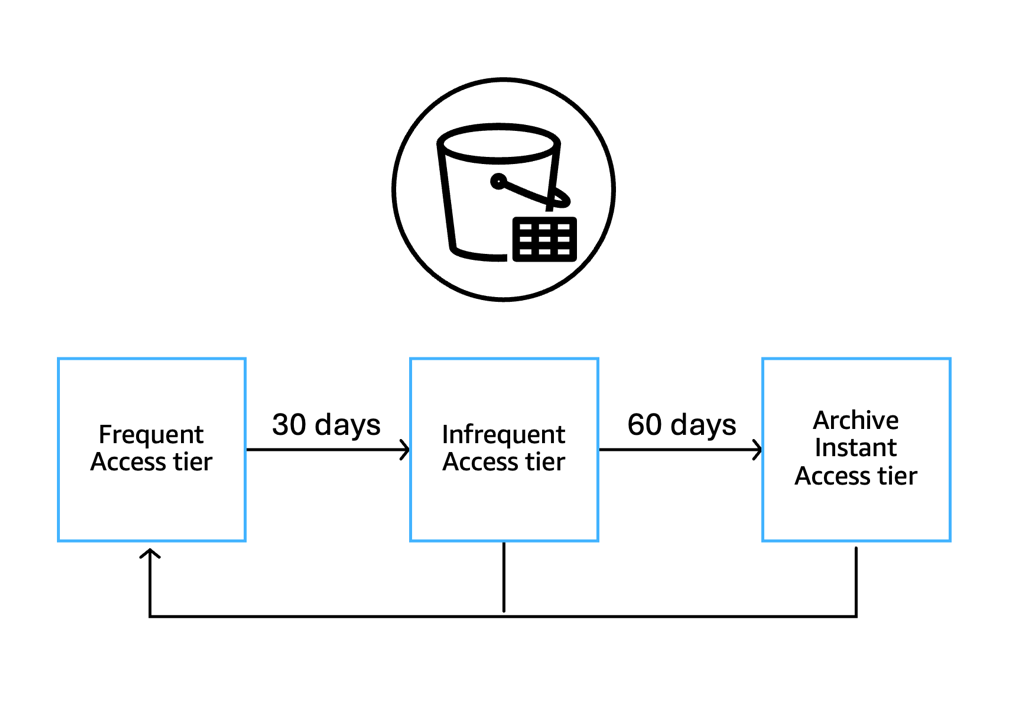
This class automatically moves objects between three access tiers (Frequent, Infrequent, and Archive Instant) based on actual access patterns, optimizing storage costs without performance impact, operational overhead, or retrieval fees.
If an object hasn't been accessed for 30 days, it moves to the Infrequent Access tier. If not accessed for 90 days, it moves to the Archive Instant Access tier. As soon as the data is accessed, it automatically moves back to the Frequent Access tier.
S3 Lifecycle Policies: Automating Data Transitions
To proactively manage data lifecycles, you can configure S3 Lifecycle rules. These rules automate the transition of objects to more cost-effective storage classes as they age.
For example, a common policy might look like:
- Store newly uploaded logs in S3 Standard.
- After 30 days, transition them to S3 Standard-IA.
- After 90 days, transition them to S3 Glacier Flexible Retrieval.
- After 365 days, expire and delete the objects.
This automated 'waterfall' approach ensures you only pay premium prices for data while it is actively useful.
Visibility and Monitoring: S3 Storage Lens
Optimizing storage is an ongoing process. To maintain cost efficiency, use Amazon S3 Storage Lens.
Storage Lens provides organization-wide visibility into object storage usage, activity trends, and makes actionable recommendations to improve cost-efficiency and apply data protection best practices. It helps identify buckets that might be good candidates for Lifecycle policies or transition to Intelligent-Tiering.
A Word of Caution: Minimum Durations and Sizes
When moving data to cooler tiers (IA, Glacier), be mindful of constraints:
- Minimum Storage Duration: Most lower-cost tiers have a minimum storage duration (e.g., 30, 90, or 180 days). Deleting or overwriting an object before this duration ends incurs a prorated early deletion charge. If you have objects that turn over quickly, putting them in an IA or Glacier tier will likely increase your costs.
- Minimum Object Size: Tiers like Standard-IA and Intelligent-Tiering have a minimum capacity charge of 128KB per object. Storing millions of tiny log files in these tiers will result in paying for 128KB per file, regardless of their actual size.
Conclusion
Right-sizing your S3 storage classes is a fundamental step in AWS cost optimization. By analyzing your access patterns, adopting Intelligent-Tiering for unpredictable workloads, and automating transitions with Lifecycle policies, you can drastically reduce your monthly AWS bill.
For more in-depth insights and latest updates on S3 optimization, we recommend checking the official AWS Storage Blog on S3 Cost Optimization.